



X (Twitter) is one of the key channels for brand outreach, social traffic, and customer service. Running one X brand account is easy, but supporting customer service, content publishing, community engagement, and audio live (Spaces) across different business lines usually requires multiple X accounts working together. This article starts from X’s account system, explains how to split account roles, the official support and limits for X multi-account usage, and how to plan networks for multi-account, multi-device operations. It doesn’t cover platform risk-control specifics; follow X’s official account policies and terms of service.
1. First Understand X’s Account System and Multi-Account Support
Account types (per currently available features):
- Personal account: the standard X account for individuals, the default for most personal users
- Professional Account: X’s professional feature set for businesses, brands, creators, publishers, and other professional users (brand profile, pinned posts, follower-stream management, etc.). It is not a separate account “identity” alongside personal accounts, but a set of capabilities you can enable on your account (features depend on X’s current availability)
X officially supports switching between multiple accounts — one X app/web client can be logged into multiple accounts and switched quickly, giving teams an officially supported way to collaborate. In addition, X offers team-oriented collaboration capabilities, so you don’t have to rely on “one person, one account, each logging in separately”:
- Delegate: X officially lets account owners delegate parts of an account’s capabilities to team members (e.g., content publishing, ads, analytics). Members operate within the granted scope using their own accounts — no need to share the account password directly
- X Pro Teams / X Pro (formerly TweetDeck): a multi-account tool that supports managing multiple accounts at once, multiple streams (timelines / mentions / lists in columns), scheduled posting, and advanced search; Teams capabilities depend on X’s current availability
Common business roles (note: these are business divisions, not official account types):
- Brand main account: external official posts, product/event announcements, crisis communication entry
- Support account: user feedback entry, order/after-sales issue resolution, public DM replies
- Content / community account: content publishing calendar, retweets/interactions, comment replies, topic curation
- Spaces operations account (a business account responsible for Spaces): hosting Spaces (audio rooms), listener engagement, event interviews — Spaces is a feature an account can use, not a standalone account type
Not every function requires its own account. For small and mid-size teams, one brand main account combined with X Pro / Delegate / team permissions can cover content, support, and community operations; splitting accounts is only more necessary when brands, audiences, or job responsibilities clearly differ.
2. Typical X Multi-Account Matrix Scenarios
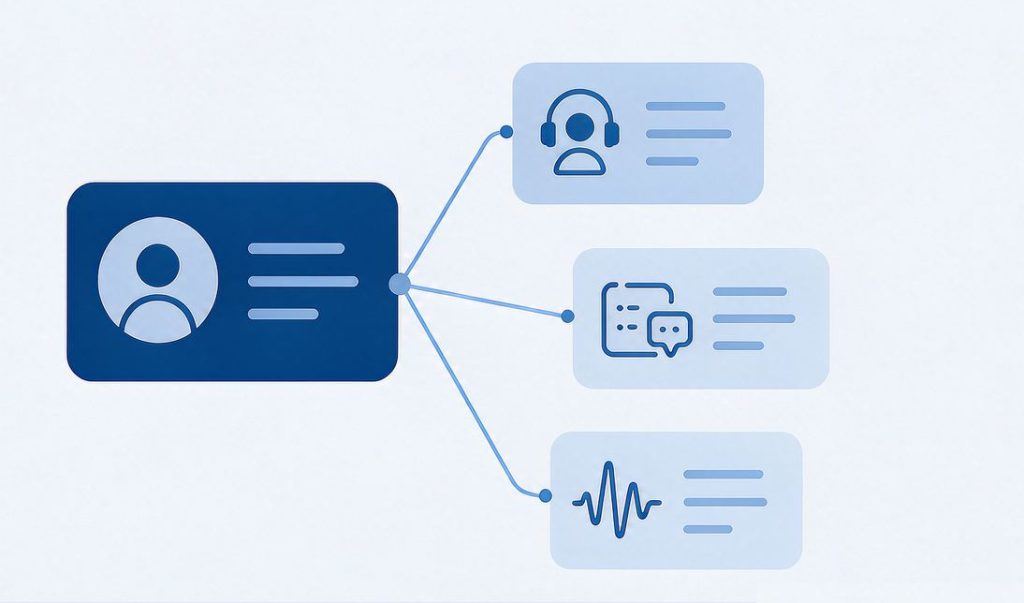
Common X multi-account configurations:
- Individual / small team: one main account + one support account — first establish the brand voice through the main account, then add a support entry; Delegate can also be used to let colleagues co-manage
- Mid-size team: brand main + content + support accounts dividing the work, with live tasks handled by the business account responsible for Spaces
- Large brand / organization: brand main, product-line accounts, support accounts, community accounts, and regional accounts managed separately; live work handled by the corresponding business accounts, coordinated via X Pro and team permissions
In these scenarios, different X functions correspond to different network uses:
- Tweet browsing / publishing / interactions: stable network
- Spaces live: upload bandwidth, latency, and the push-stream link (the same principles as in the TikTok live streaming network guide apply to X Spaces)
- Customer service DMs: stable access, clear environment
- Data collection (public tweets / trend analysis): fixed exit, cost and concurrency considerations
3. How to Configure the Network for X Multi-Account
For brand teams, the network environment should first solve stable backend access, personnel collaboration, and account asset management. X itself supports multi-account switching and team delegation (Delegate / X Pro Teams), so there is no need to treat “one account, one IP” as a default setup — the key to network planning is clarifying account roles, team division, and content scenarios first, then deciding whether separate exits are needed.
| Business scenario | Network priority |
|---|---|
| Single brand account regular operations | Stable, fixed exit |
| Multi-account division (brand + support + content) | Group reasonably by account role and team ownership |
| Spaces live | Upload bandwidth, latency, push-stream link |
| Customer service DMs & public replies | Stable access, clear environment |
| Public data collection (trends / tweets) | Fixed exit, cost, concurrency, and X platform constraints |
On “independent IP”: independent exits are a management approach, not a platform mandate — X officially supports multi-account switching and team delegation; whether independent exits are needed depends on account role, team division, and content scenario. The network environment serves business collaboration, not workarounds.
4. Multi-Account / Multi-Device: Treat It as Team Asset Management
X multi-account operations includes many accounts and devices (phones, tablets, web, X Pro multi-column management). The focus is team asset and operations management (records, handover, troubleshooting), used together with X Pro / Delegate authorization and collaboration:
- Record each account’s business line and responsible person
- Record the devices and login terminals used
- Record the network exit (for fixed exits, note the IP environment)
- Update records on personnel handover
- Troubleshoot login anomalies or content disputes easily
- Plan independent network exits when different brands/business projects need separation
X officially supports multi-account switching and multi-device logins; whether isolated exits are needed is more a team asset management need than a platform requirement.
5. Rate Limits and Usage Norms
X applies rate limits to API calls and automated/batch operations — they constrain interface requests, automation, and high-frequency operations, not ordinary usage like “how many accounts are logged into a device.” When planning content publishing and automation tools:
- Follow API call frequency and automation rules (per X developer documentation), avoiding high-frequency, batch automation in a short window
- For batch publishing or data collection, control frequency and concurrency per X’s official rules on automation and batch behavior
- Don’t follow any “warm-up / anti-restriction tutorial” style methods — use the platform as intended
6. FAQ
Q: Can X multi-account use the same network exit?
A: Yes. Same team on the same business line sharing an exit doesn’t necessarily mean issues; if different brands, business lines, or team ownership need separate management, plan independent exits.
Q: Do X multi-account need one IP per account?
A: X officially supports multi-account switching and doesn’t generally require “one account, one IP.” Whether independent exits are needed depends on team management, business isolation, and content scenario.
Q: Will changing IP help with X Spaces lag?
A: If lag comes from the network line or exit quality, replanning the network may help; but first check upload bandwidth, latency, push-stream link — IP type alone can’t replace these.
Q: How to manage multi-account without triggering rate limits?
A: Follow X’s official usage rules, avoid high-frequency / batch automated behavior, divide accounts sensibly, and keep records & handovers clean.
7. Summary
The core of an X multi-account matrix is choosing the right structure first: brand main + support + content/community business accounts (live features like Spaces handled by the corresponding business account) — then combine team permissions with X Pro for collaboration, and manage accounts, devices, people, business lines, and network exits as registered assets. Full logic:
Account role → Team permissions → Content/support/Spaces scenario → Network environment → Asset managementThe point of X multi-account operations is not simply adding more accounts — it’s deciding the account structure by brand, support, content, and community responsibilities, then using X Pro and team permissions for collaboration. The network environment serves stable access, team collaboration, and business asset management; there’s no need to mechanically follow “one account, one IP” (team collaboration standards in the team multi-account IP plan).
For fixed, stable exits: if the main need is a stable fixed exit → Static Datacenter IPs usually suffice (available at IPNut); if you also need ISP/residential network-source attributes → Static Residential ISP. What a brand matrix needs most is content and interaction cadence; the network environment’s job is to keep that cadence running.
