



“Is the proxy I bought a native IP?” “How do I know if I’m currently on a datacenter IP?” Almost everyone asks these questions when choosing a proxy. This article first clarifies native IP, residential IP, and datacenter IP, then gives you a practical method to check it yourself — no guessing, confirm it in minutes.
1. First, Clarify the Three Concepts
- Native IP: emphasizes local network ownership in the target region — location, ASN, and network attributes all point locally, making it look “like a local network.” It emphasizes “local attributes,” and is not necessarily a residential IP.
- Residential IP: essentially home/personal network addresses allocated by ISPs, emphasizing home/personal access attributes. Static residential ISP proxies typically fall into this category.
- Datacenter IP: IP addresses held by data centers/cloud providers, typically corresponding to cloud computing, hosting, or IDC networks. Their ASN type is marked Hosting/Data Center, making platforms more likely to identify them as non-typical user networks.
One-line distinction: residential IPs are like “locals living in the neighborhood”; datacenter IPs are like “companies in an office building” — their network characteristics differ clearly. One addition: “native” emphasizes local network attributes in the target region, not necessarily residential.
2. Why Everyone Cares About This Difference
Different scenarios have different tolerance for IP types:
| Scenario | Preferred IP type | Reason |
|---|---|---|
| Multi-account operations on social platforms | Residential/Native | Closer to real user networks; more natural environment signals |
| E-commerce store management | Residential/Native | Platforms are more sensitive to datacenter IPs |
| Data scraping | Datacenter also works | Speed and stability matter more; “disguise” is less critical |
| Ad verification | Depends on platform | Some platforms restrict datacenter IPs |
This doesn’t mean datacenter IPs are “bad” — they are legitimate, efficient network resources, just more easily identified as non-typical users by their network characteristics. Choose based on your use case.
3. How to Check Which IP Type You Have (3 Steps)
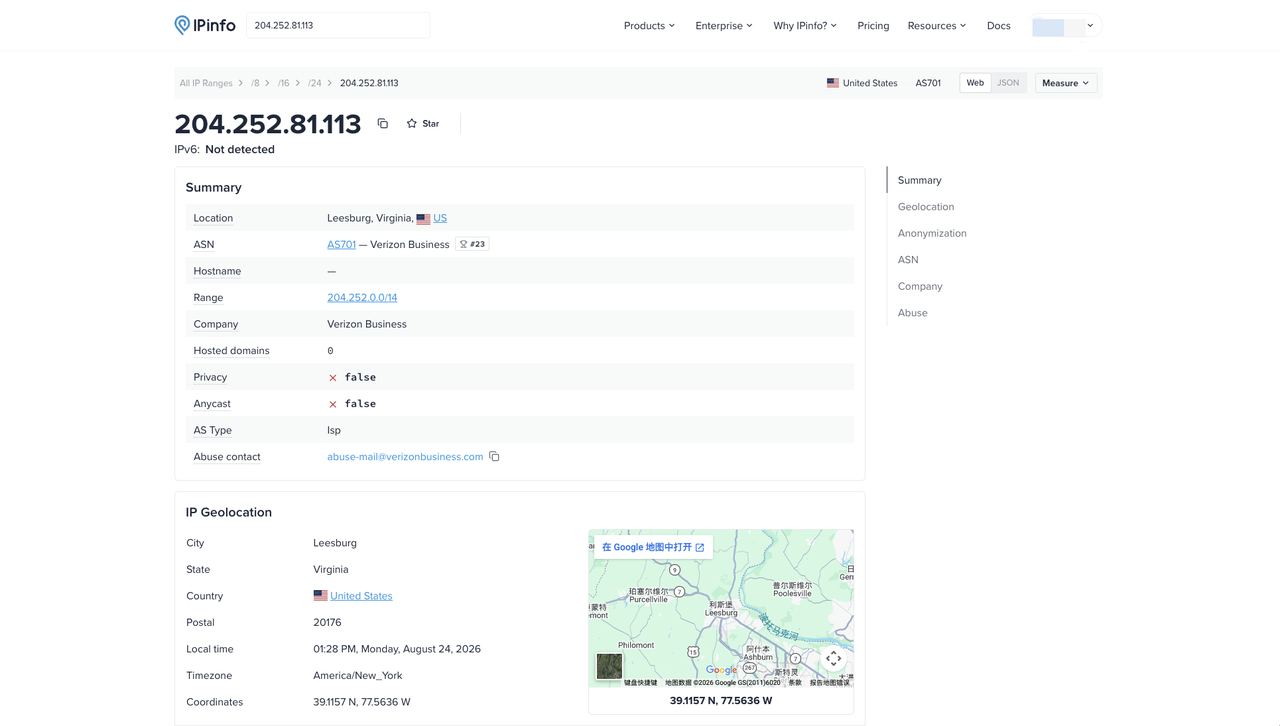
Step 1: Look up IP ownership and ASN info
Open an IP detection tool (e.g., IPinfo, Scamalytics, or IPNut’s in-environment detection page) and check several fields: country/region, ISP/ASN, Organization, Network Type, IP type.
Step 2: Check the ASN type flags
Different labels mean different things — don’t conclude from a single one:
| Label | Typical meaning |
|---|---|
| Hosting / Data Center | Usually a strong hint of datacenter, cloud, or hosting networks |
| Business | Usually a business/enterprise network — cannot be directly equated with a datacenter IP |
| ISP | Indicates the IP relates to an internet access provider network — but alone doesn’t prove a residential IP |
| Education / Organization | Reflects the owning institution or classification — not a standalone basis for judging residential IP |
Key point: a single label can’t prove an IP is residential, native, or datacenter — you need to judge comprehensively (ASN + network type + geolocation + cross-checking multiple databases).
Step 3: Compare against your use case
- For scraping/speed-first tasks, datacenter IPs are perfectly fine
- For account operations, confirm your exit is residential/ISP type
Note: different detection databases may vary slightly — that’s normal. Focus on the primary flags rather than a single field.
4. FAQ
Q: Are native IP and residential IP the same thing?
A: They overlap, but they’re not fully equivalent. Native emphasizes “local network ownership in the target region”; residential emphasizes “home/personal access attributes.” Static residential ISP proxies usually have both ISP network ownership and residential network attributes — but not all native IPs are residential, and vice versa.
Q: Can datacenter IPs ever be used?
A: Yes. They work well and efficiently for data scraping and batch verification. For account operations, though, platforms are more sensitive to datacenter IPs, so residential/ISP types are the safer choice.
Q: Can detection tools be inaccurate about IP type?
A: Results depend on third-party databases’ freshness; different tools may differ. Judge by combining ASN, Organization, Network Type, IP geolocation, and multiple databases’ results — with ASN and network type as important references — and cross-check with two tools if needed.
5. Summary
Native, residential, and datacenter IPs describe different dimensions of network attributes: native emphasizes local network ownership in the target region; residential emphasizes home/personal access; datacenter typically corresponds to cloud, hosting, or IDC networks. Checking is three steps: look up ownership → check ASN and network type → match your scenario — and remember that “a single label doesn’t decide.” Knowing which type you’re on lets you choose the right environment — residential/ISP for account operations, datacenter for data tasks.
IPNut‘s Static Residential ISP provides operator-assigned, fixed exit IPs with residential network attributes — suitable for account operations. Static Datacenter IPs suit data scraping and batch tasks. Use the judging method in this article to pick what fits your needs.
