



Before launching ads to a target region, it’s wise to confirm one thing: how your landing pages and creatives actually perform under a target-region IP — loading, region-specific content, and localization. This article presents a simple region simulation method: use a target-region static IP to simulate that region’s network access environment, and surface issues before launch. It focuses on localized website/creative testing, not ad-delivery strategy.
1. Why Run Region Simulation Before Launch
Whether a website or ad creative shows region-specific content can be affected by the visiting IP, browser environment, cookies, and the site’s own rules. Testing from home or another region may not surface issues that only appear when target-market users visit. Common problems:
- Landing-page localization errors: language, currency, timezone render for the wrong region
- Ad/creative display differences: creatives differ in visibility or presentation across regions
- Loading and performance differences: access speed and CDN nodes differ by region
- Platform display differences: ad previews are only accurate in the target-region environment
If these surface after launch, you’ve wasted testing-period budget and optimization chances. A target-region network simulation before launch costs little and pays off clearly.
2. Core Method: Simulate the Network Access Environment with a Target-Region IP
Principle: when accessing a website, servers and platforms return region-specific versions based on your IP region. Using a target-region static IP simulates that region’s network exit environment, helping you test how the site and platform actually perform under target-region IP conditions. Combining this with browser language, timezone, and other environment settings can bring test results closer to the target-region user environment.
Important: IP region is an important factor in region simulation, but it does not fully reproduce a real local user environment.
Steps:
- Prepare a target-region IP: for the US market, prepare a US static IP (see the US static residential IP plan)
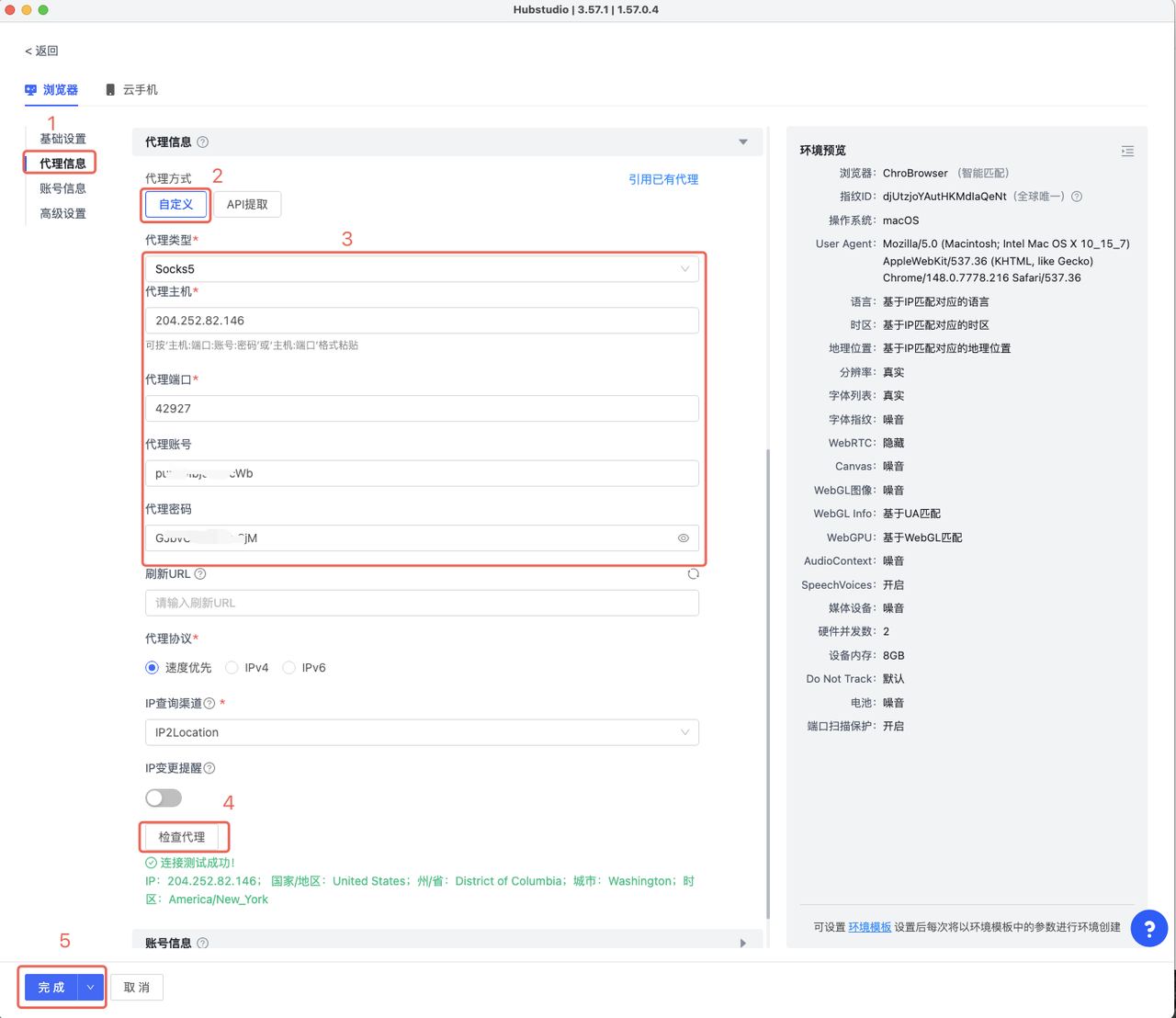
- Configure the environment and verify the IP region: configure that IP in a browser environment, confirm the exit IP’s country/region meets expectations
- Open landing pages and creatives in that environment: follow the target-region path; check loading, localization, and functionality
- Record results: screenshot + note issues, fix before launch
On IP verification: first confirm the exit IP’s country/region meets expectations. Because different GeoIP databases and platform identification mechanisms can differ, combine multiple detection results and actual target-site verification (below is a US static IP region detection example):
3. Test Checklist (After Opening the Target-Region Environment)
- □ Landing page loads normally (no region-restriction prompts)
- □ Language/currency/timezone display for the target region
- □ Creatives open normally in the target region
- □ Key functions (forms, add-to-cart, checkout entry) work
- □ Target-region CDN / loading speed normal
- □ Cookies / region selection behave as expected
- □ Region-related redirects and page logic work normally
4. Common Questions
Q: Can’t I just test with my local network?
A: Your local network only verifies display under your current network environment; it can’t fully cover localization issues that may appear under target-region IP conditions. Testing with a target-region IP gets you closer to the target market’s actual access environment.
Q: Do I need to cover multiple regions?
A: Follow your targeting. For multi-market delivery, test landing pages and localized content separately using each region’s IP.
Q: Is one test enough?
A: Recommend re-testing whenever creatives/landing pages change significantly, and re-checking after environment changes. Also re-test when region rules, payment methods, currency, language, or URL redirect logic change.
5. Summary
The pre-launch region simulation logic: target-region IP → simulate the target-region network environment → verify the IP → test landing pages and creatives → check localization features → fix issues before launch.
To be clear: a static IP is one piece of network infrastructure in region simulation — it helps verify how sites and platforms perform under target-region IP conditions, but it cannot fully replace a real local user environment. It brings testing closer to the target-region access environment, not “fully simulating a real local user.”
If you need to test pages from a specific region steadily and long-term, use a fixed target-region IP as the test environment’s network exit. IPNut‘s Static Residential ISP is available by region (e.g., US IPs); for data tasks, use Static Datacenter IPs. For environment setup, see the AdsPower tutorial and the Hubstudio tutorial.
