



For teams running Facebook ads for the US market, how to configure the ad account’s network environment and choose an IP is a common question. This article is not an ad-creation tutorial (no campaign setup, audience targeting, or bidding) — it focuses on the network-environment layer: how to choose an IP for US ad delivery, how to verify it, how to keep the environment stable, plus checklists and FAQs. It covers network-environment practices only, with no promises about ad review, account security, or delivery performance.
1. Why Network Environment Matters for Facebook US Ads
Facebook ad targeting is primarily decided by the audience, region, and other settings in the campaign. For advertisers managing the US market, keeping a stable, reasonable network environment when managing the ad account helps reduce inconsistency between the login environment and the actual business scenario — for example, managing US-market ads from a US network environment makes environment signals match the business context better.
To be clear: IP is only part of the ad-delivery infrastructure and cannot determine ad review, delivery performance, or final conversion. A solid network environment is “doing your controllable part well,” not a guarantee that ads pass or perform.
2. The Role of a US Static Residential IP in the Ad Scenario
For teams that need to manage ad accounts from a US network environment long-term, preview US-region pages, or run localization tests, a US static residential ISP can serve as one network-environment option:
- Fixed exit IP owned in the US; relatively stable network environment
- Fits ad-account management, US-region page previews, and localization testing
- For judging IP type and ownership, see Native IP vs Datacenter IP
Note: this doesn’t mean “US ads require a US residential IP.” The network environment should stay reasonably consistent with your actual operating location and business scenario; how to configure it depends on how your team manages ad accounts.
3. IP Selection and Verification: Confirm the Exit Meets Expectations
After configuring a US IP, verify the exit actually meets expectations. Below is a real verification example (Hubstudio checking an IPNut US IP after configuration):
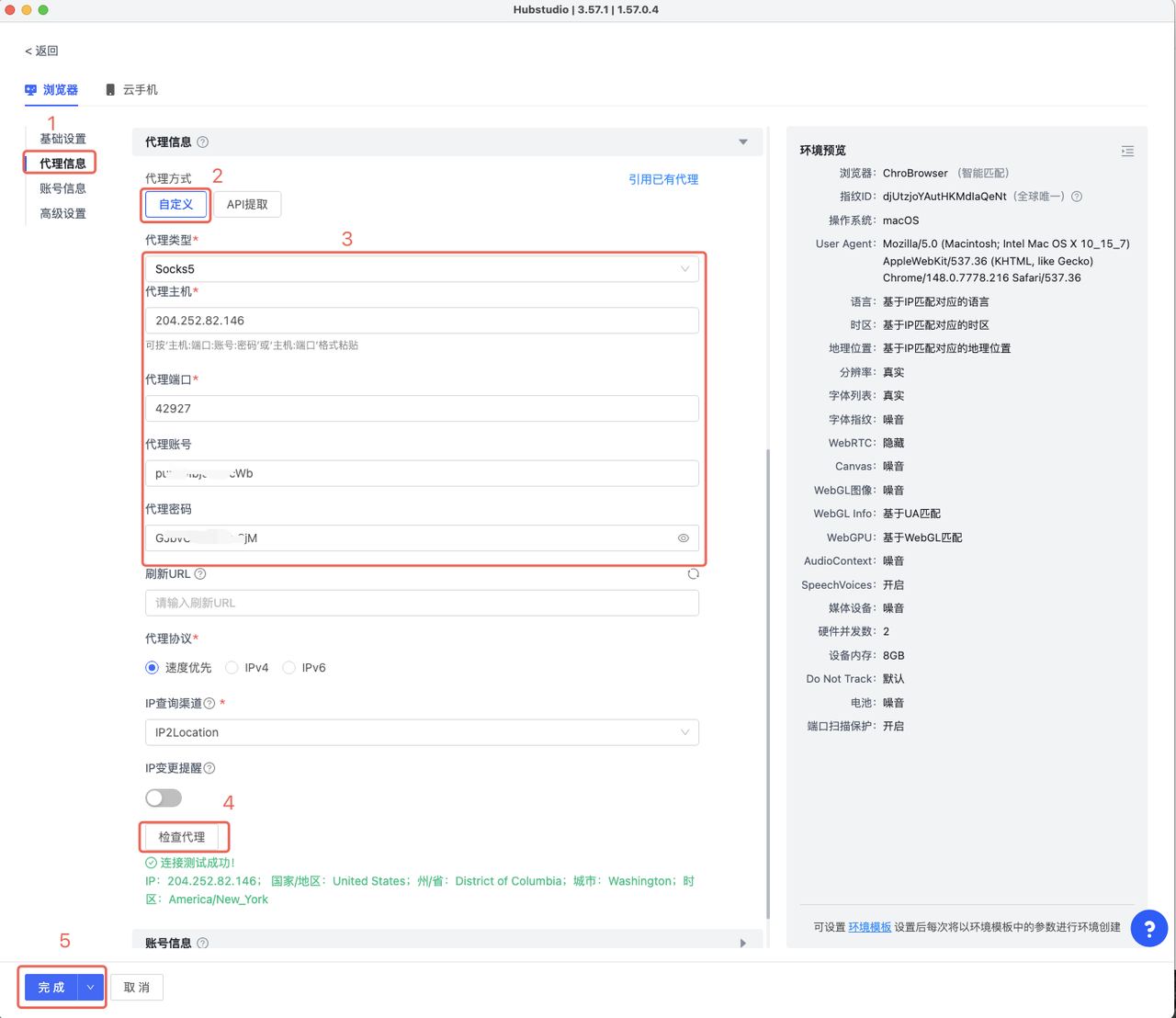
Verification points:
- Country-level location meets expectations: first confirm country/region shows United States. City-level location may be affected by different GeoIP database updates, geolocation algorithms, and platform-specific data — so some deviation across detection tools is not rare (details in IP geolocation deviation)
- Actual exit IP matches the config: the IP shown should equal the IP you configured (fixed exit)
- No obvious leaks: confirm DNS/WebRTC aren’t exposing your local network (see the DNS/WebRTC leak fix guide)
When results differ: combine multiple GeoIP sources and the actual business platform for judgment — don’t conclude from a single detection website.
4. Pre/During/Post-Launch Environment Checklist
Before launch:
- □ IP detection shows the expected country/region
- □ Actual exit IP matches the configured IP
- □ No obvious DNS/WebRTC leaks
- □ Ad-account login environment stable
- □ Browser environment consistent with the network config
During launch:
- □ Ad Manager access normal
- □ US-region creative/page previews normal
- □ Landing pages accessible under the target network environment
- □ No frequent network-exit switching
After launch:
- □ Record IP, region, browser environment, and other config
- □ When issues arise, first check network connection, IP ownership, and environment config
- □ Don’t judge an IP as abnormal from a single GeoIP result
5. Environment Stability and Platform Rules
A stable network environment mainly serves to reduce unnecessary environment changes; it doesn’t mean you can circumvent Facebook’s account review, identity verification, or ad-policy requirements. Advertisers should still follow platform rules — the network environment is operational infrastructure, not a way around the rules.
6. FAQ
Q: Does a US IP guarantee local users?
A: No. A US IP primarily addresses network-environment and access-environment needs; which users ads actually reach still depends on Facebook’s audience, region, creatives, budget, bidding, and platform algorithms.
Q: Does city-level geolocation deviation affect delivery?
A: City-level GeoIP deviation doesn’t necessarily mean ads can’t deliver normally. Whether it affects a specific business depends on the ad platform’s own identification results and actual business needs.
Q: Should I keep the same IP all the time?
A: For long-term management of the same ad account, a stable network exit usually makes it easier to maintain a consistent operating environment than frequent switching. But this is not a way to circumvent platform review or guarantee account security.
7. Summary and Selection Advice
The core logic: US ad business → reasonably match the network environment → use a stable US IP → check IP ownership and leaks → keep the environment stable — throughout, no promises about ad review, account security, or delivery performance; ads themselves are decided by platform rules and algorithms.
If your business needs to access the ad backend from a US network environment long-term, test US-region pages, or maintain localized operations, consider a fixed US static residential ISP as the network exit. When choosing, focus on IP country/region ownership, ISP type, stability, and how the actual business platform identifies it.
For a US-region fixed exit, IPNut‘s US Static Residential ISP is available by region; for ad-account troubleshooting, see Facebook Ads Account: IP-Focused Protection; for data tasks, use Static Datacenter IPs.
