



“Proxy filled in but won’t connect,” “proxy check says authentication failed,” “times out after a while” — among the most common proxy issues. This article gives a systematic troubleshooting guide: classify the error type first, then check item by item in order, to quickly tell whether the problem lies in proxy parameters, the local environment, or the target website. The methods apply to common HTTP/SOCKS5 proxy configuration scenarios.
1. First, Classify the Error: Three Common Types
Connection-type: Connection refused, Connection timeout, connection rejected
- Usually points to: wrong host/port, target port not listening, network-link or firewall issues
Auth-type: authentication failed, Proxy Authentication Required, 407, etc.
- Usually points to: wrong username/password, authentication-method mismatch, or abnormal account status
Access-type: proxy connects but the target site won’t open; specific sites unreachable
- Usually points to: the target site’s own access restrictions or authentication requirements
Note: 401 Unauthorized doesn’t always mean proxy authentication failed — it may come from the target website’s own authentication (login/permission required). Classify first, then follow the order below.
2. Troubleshooting Steps (In Order)
Step 1: Verify proxy parameters
- Protocol: matches the proxy’s support (HTTP/HTTPS vs SOCKS5 — see SOCKS5 vs HTTP proxy). Note: a protocol mismatch (e.g., an HTTP client configured with SOCKS5, or a SOCKS5 client configured with HTTP) may appear as connection failure, handshake failure, or other protocol errors — not necessarily “authentication failed”
- Host, port: consistent with the proxy info (no spaces, case, or extra characters)
- Username, password: correct (passwords are case-sensitive)
- IP still within validity
Step 2: Test the proxy connection with a tool
Run “Check Proxy” in the proxy tool/browser environment to confirm the proxy can establish a connection:
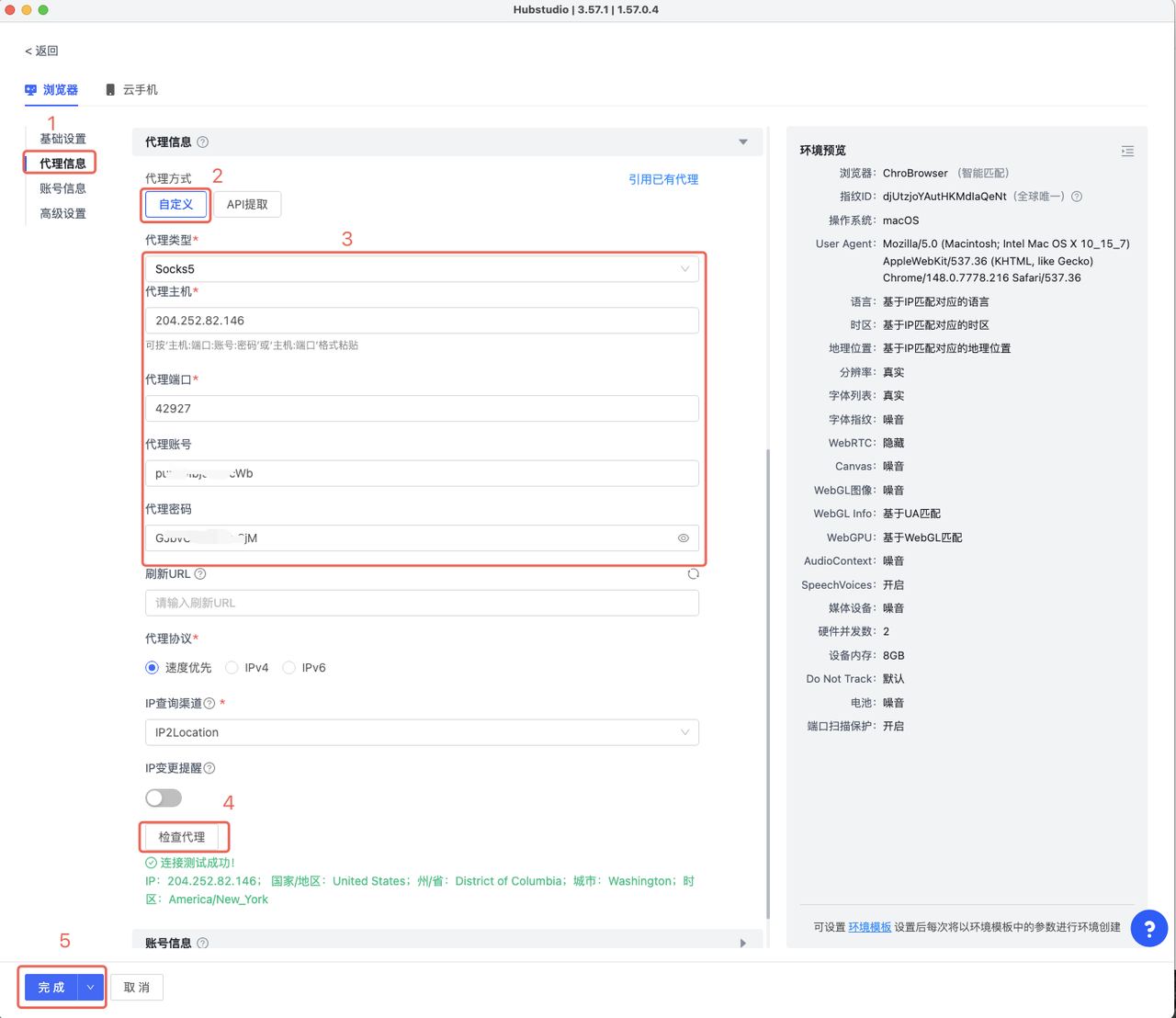
- Check succeeds → the current tool can establish a connection through the proxy; continue with actual website access tests (this doesn’t mean every site will work)
- Check fails → return to Step 1 to verify parameters, or cross-verify with another proxy test tool (to tell whether it’s a proxy-parameter issue or a tool-environment issue)
Step 3: Distinguish “local-environment issue” from “target-website issue”
When the proxy connects but a site won’t open:
- First visit other ordinary sites for comparison — others work, only the target fails → likely target-site restriction or the exit blocked by the target
- If all sites are unreachable → first check proxy config, local network, protocol, DNS, and firewall issues; if sites load but detection exposes local network addresses, then check DNS/WebRTC leaks (see the DNS/WebRTC leak guide) — don’t attribute “all sites down” directly to DNS/WebRTC
Step 4: Record the full scenario
Record at the time of the error: IP, region, protocol, tool/browser environment, target website, error time, and the full error message. Screenshot + full error + the environment in use — most helpful when contacting support later.
3. Quick Error Reference
| Error | Common cause | Check first |
|---|---|---|
| Connection refused | Wrong host/port, target port not listening, or connection actively rejected | Host and port |
| Connection timeout | Network link, firewall, target unresponsive, etc. | Network and IP validity |
| 407 Proxy Authentication Required | Proxy authentication failed | Username, password, auth config |
| 401 Unauthorized | Target website authentication issue (not necessarily proxy auth) | Target site account or permissions |
| Proxy authentication failed | Auth method or credentials mismatch | Protocol and auth config |
| Connects but site won’t open | Target restriction / local-environment issue | Compare sites + layer-by-layer checks |
4. FAQ
Q: The proxy check succeeds but websites still won’t open?
A: A successful check only means the current tool can connect through the proxy, not that every site works. Compare other sites first: if only a specific target fails, it’s likely the target site’s own restrictions or authentication requirements.
Q: Same error after switching proxies?
A: If multiple different proxies produce the exact same error, prioritize checking the local tool, proxy config, or local network environment — don’t keep switching proxies. When different proxies all fail the same way, the problem is likely not the proxies.
Q: Who should I contact about an error?
A: Use this guide to locate the “proxy parameters / local environment / target website” layer first; if it’s a proxy-service issue (IP expired, account issue), contact the provider with a full error screenshot + the environment info in use for faster handling.
5. Summary
The core of proxy-error troubleshooting is classify first, then rule out layer by layer: classify the error → verify parameters (protocol/host-port/credentials/IP validity — note that protocol mismatches can masquerade as connection errors) → test the proxy connection → distinguish local environment vs target website → record the full scenario → contact the provider if needed. Most connection-type errors are solved at the parameter step; if you still can’t locate it, contact the provider with the full error info.
For reliable proxy services, IPNut‘s Static Residential ISP and Static Datacenter IPs support both HTTP/SOCKS5; the dashboard shows proxy info and validity — troubleshoot with the steps above or contact support.
